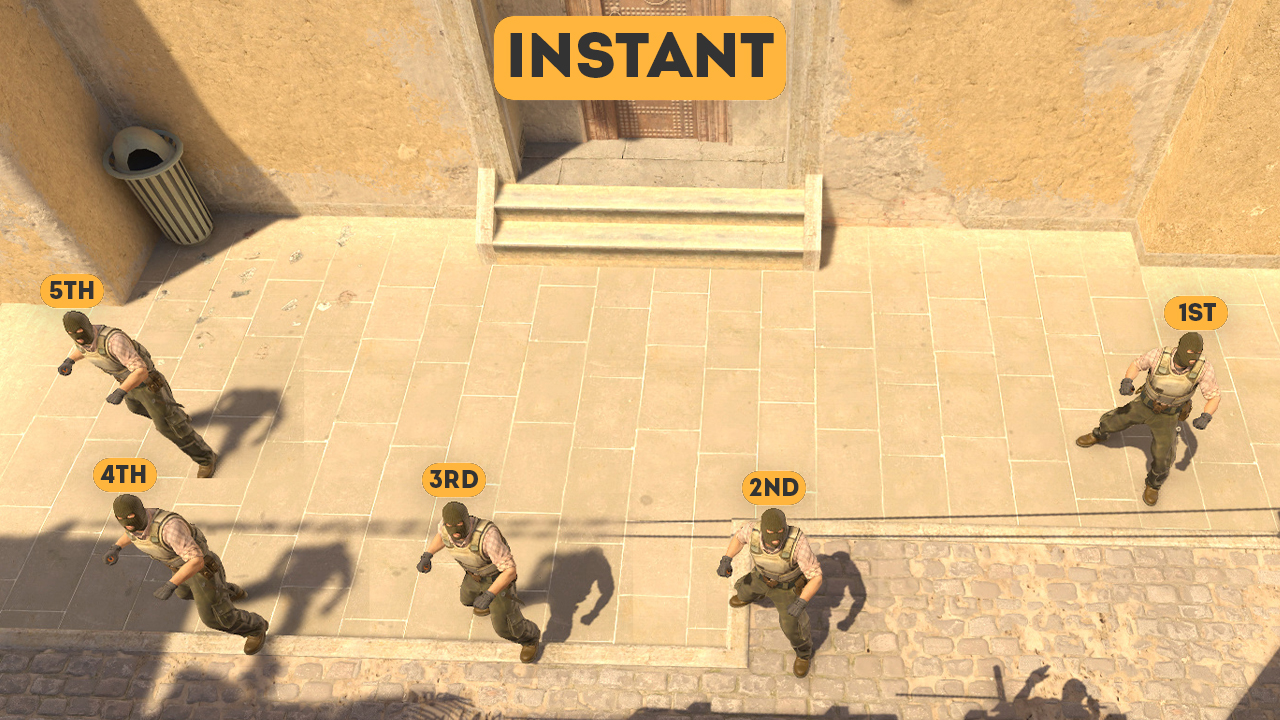

An instant Window smoke on Mirage allows the attacking side to block the main defensive position in Mid within the first few seconds of the round. This guide includes all five T-spawn variations available on CS2Nades.gg. It also explains why the team needs an early Window smoke, how to synchronize it with a Mid take, and which mistakes players most commonly make while throwing it.
Strategy
An instant smoke is a smoke grenade thrown directly from the player’s spawn point without spending time finding a corner or adjusting the starting position. On Mirage, the smoke lands in Window and blooms as the fight for Mid begins. Its main advantage is speed: the team can immediately move toward Top Mid while the defender in Window loses the direct line of sight.
Why Smoke Window at the Start of the Round?
Window is one of the strongest starting positions for the CT side on Mirage. From there, an AWPer can control the exit from Top Mid, support the Connector player, and quickly fall back toward Jungle or Kitchen/Market. An early smoke removes the most dangerous direct peek and reduces the risk of losing the first player before taking control of the center.
Mid control gives the attacking side several possible continuations: an A split through Connector, a B split through Short, pressure through Underpass, or fast rotations between the bombsites. An instant smoke does not automatically secure Mid—Connector, Short, a possible boost, and counter-utility remain active threats—but it makes the first stage of the Mid take considerably safer.
Spawns
The Mirage Window instant-smoke page uses five specific T spawns, numbered from Spawn #1 to Spawn #5. If you spawn at a different position, do not try to adapt the nearest variation. Even a small difference in the starting position changes the grenade’s trajectory.
In that round, it is better to throw a standard Window smoke from a safe position or assign the grenade to a teammate who received one of the correct spawns.
Spawn #1
Spawn #2
Spawn #3
Spawn #4
Spawn #5
Throwing Technique
How to Perform the W + Jumpthrow Technique Correctly
Equip the smoke before you begin moving, aim at the reference point for your spawn, and do not adjust your starting position. Begin moving forward with the W key and perform the jumpthrow with the same timing shown in the lineup video.
After releasing the grenade, continue moving with your team. There is no need to stop and watch its trajectory during a competitive round.
For consistent results, use the same mouse sensitivity, avoid moving your mouse at the moment of release, and repeat each variation several times on a practice server. No prolonged positioning is required: the purpose of an instant smoke is to throw it directly from the original spawn point.
Round Plan
Who Should Throw the Instant Smoke and When?
Assign the role before the round begins during freeze time. The player with the appropriate spawn buys a smoke and immediately tells the team that they will block Window. The other players prepare to take Mid, ready a flash over Top Mid, or watch for early aggression from Connector.
The ideal timing has the smoke blooming before the team’s first full contact with Window. A late throw loses the main advantage of the instant lineup, while pushing too early without confirming that the smoke has landed leaves the entry player exposed to the AWP.
What to Do After Smoking Window
The basic continuation is to take Top Mid and Mid Boxes behind a flash, check Connector and Short, and then decide how to develop the round.
For an A split, the team can pressure Connector. For a B split, it can advance through Short, while a player in Underpass creates another angle of pressure. You do not need to force an execute every time. Simply taking Mid safely forces the CTs to reveal their setup and spend utility in response.
What to Combine with the Window Smoke
The Window smoke is especially effective when combined with an early Mid flash. After taking space, the team can use a Molotov, smoke, or HE grenade in Connector or toward Short, depending on whether the plan is to finish on A or B.
Do not automatically throw a second smoke into Window. It is often better to save the grenade for blocking a rotation or re-establishing control if the first smoke fades before the team finishes its play in Mid.
A Window smoke does not block players in Connector, Short, or Underpass, and it does not prevent a CT from aggressively pushing through the smoke. The defense can also temporarily clear part of the smoke cloud with an HE grenade or use a flash to set up a repeek.
Mid must therefore still be taken with proper crosshair placement, trades, communication, and supporting utility.
Common Mistakes
The first common mistake is selecting a lineup that does not match your spawn number. The second is taking a step before aiming and changing the starting coordinates.
The third is breaking the timing between the W movement and the jumpthrow. This gives the grenade a different velocity and may cause it to hit the building façade or bloom outside Window.
Players also frequently begin moving into Mid without telling their teammates that the smoke has already been thrown. Another mistake is assuming they can challenge the Window defender without the smoke, which may result in giving away the opening kill and playing the rest of the round at a disadvantage against an AWP.
How to Practice the Window Smoke
Open Mirage in practice mode and set each position from the list by copying the corresponding setpos command. For each spawn, do not stop after landing one successful smoke. Perform a full series of throws without missing.
After that, practice the complete sequence: throw the smoke, immediately move toward Mid, and place your crosshair on the first angle you need to clear. This turns the lineup from an isolated trick into a practical opening-round routine.
A standard lineup is useful when no player receives a suitable spawn, the player forgot to buy a smoke, the instant-smoke timing was missed, or the team decides to play a slower default. Instant smokes complement Mirage’s standard utility rather than replacing it completely.
CS2Nades.gg also has a separate guide containing full instructions and a set of commands for practicing grenade lineups.
FAQ About Mirage Window Instant Smokes in CS2
What is an instant Window smoke on Mirage?
It is a smoke thrown into Window directly from a T-side spawn point. It blooms as the fight for Mid begins and blocks the Window defender’s direct line of sight.
How many spawns are included in this guide?
The guide includes five T spawns—the exact five shown on the specified CS2Nades page. Their numbering should not be replaced with the spawn order used in another video or guide.
Can I use the same aiming point for all T spawns?
No. Each of the five spawns has its own aiming point. The throwing technique is the same, but even a small change in the starting position affects the grenade’s trajectory.
How do I throw these instant smokes?
All five variations use forward movement and a jumpthrow. Aim from the original spawn point, begin moving with the W key, and perform the jump and grenade release with the practiced timing.
Do I need a special jumpthrow bind?
The guide does not require a complicated positioning bind. Follow the demonstrated W + jumpthrow input and practice performing the actions consistently. The most comfortable input method may differ depending on the platform and control configuration.
Why is an early Window smoke important?
It removes the direct AWP or rifle peek from Sniper’s Nest and helps the T side take Top Mid more safely. From there, the team can develop an A split through Connector, a B split through Short, or pressure through Underpass.
Does the smoke guarantee full Mid control?
No. The team must still check Connector, Short, Underpass, a possible boost, and CTs pushing through the smoke. The instant smoke removes one key angle but does not replace flashes, trades, and communication.
What should I do if I do not receive one of the five spawns?
Do not try to adapt the nearest variation by eye. Assign the smoke to a teammate with the correct spawn or use a standard Window smoke from another position after leaving T Spawn.
How can I learn all five variations faster?
Use the overview map and the practice
setposcommands from the Cards by Sections sheet, then repeat each throw in full sets. After consistently landing the smoke, practice the continuation: immediately move toward Mid and take the first control angle.